Stratusphere BETA
AWS Infrastructure Visualization & Terraform Code Generation Platform
A cross-platform desktop application built with Wails v2 and Go 1.24, providing real-time AWS resource discovery, interactive topology visualization, and reverse-engineering capabilities for Infrastructure-as-Code generation.
Overview
📢 Beta Version Notice: Stratusphere is currently in beta. While core features are functional, you may experience bugs, performance issues, or incomplete functionality. We appreciate your feedback and bug reports!
Resource Discovery
Parallel fetching of AWS resources across 12+ services with automatic pagination and rate limiting
- EC2, VPC, RDS, S3, Lambda
- Load Balancers, ECS, IAM
- CloudWatch, Cost Explorer
Topology Visualization
Interactive D3.js force-directed graphs showing resource relationships and dependencies
- Hierarchical network layouts
- Drag, zoom, pan interactions
- Real-time updates
Terraform Generation
Reverse-engineer existing infrastructure into production-ready Terraform HCL code
- Dependency resolution
- Variable extraction
- Multi-file organization
Security First
AES-256-GCM encryption for credentials with local-only processing
- PBKDF2 key derivation
- No external data transmission
- Least-privilege IAM policies
Application Screenshots
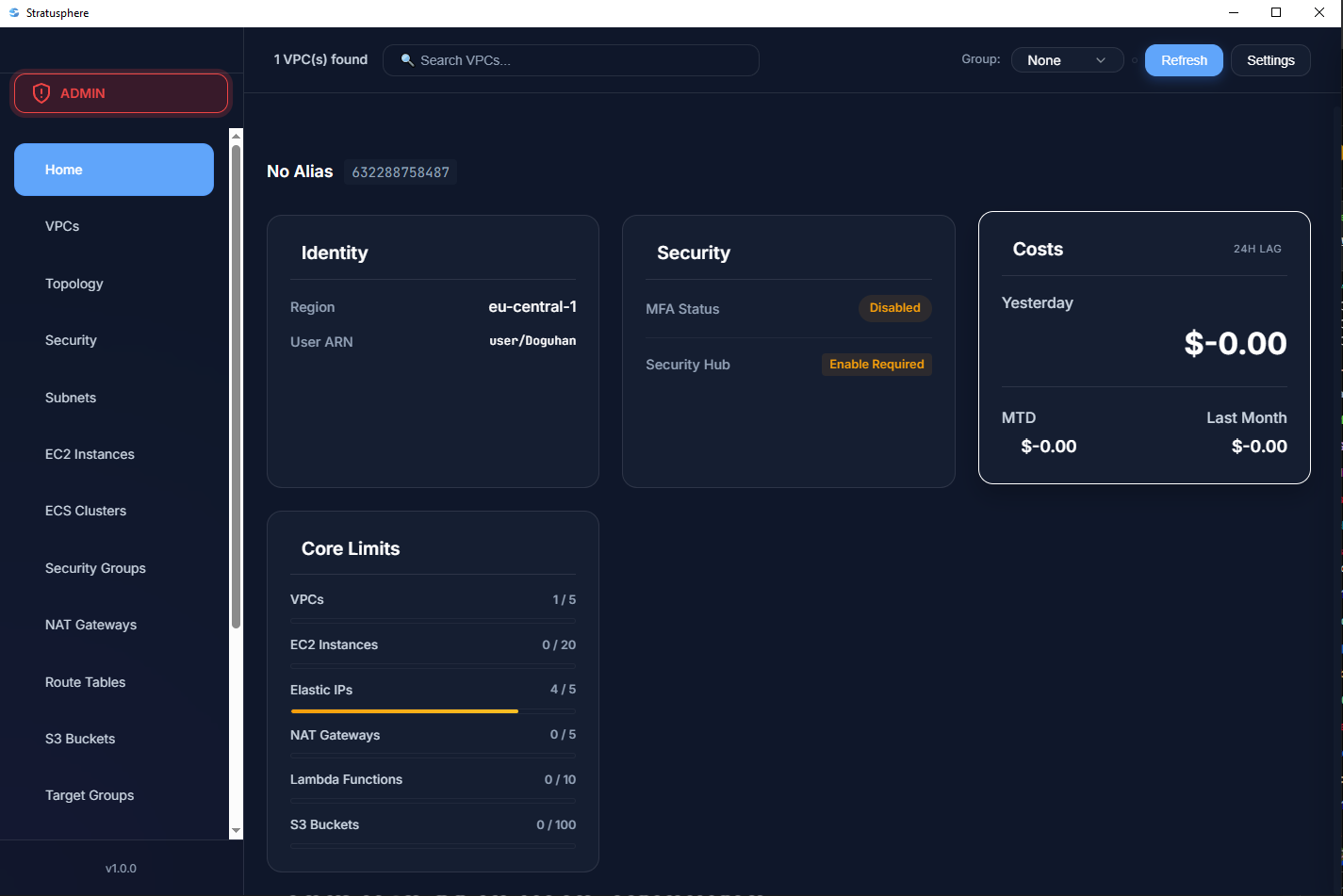
Dashboard Overview
Your AWS overview in one place
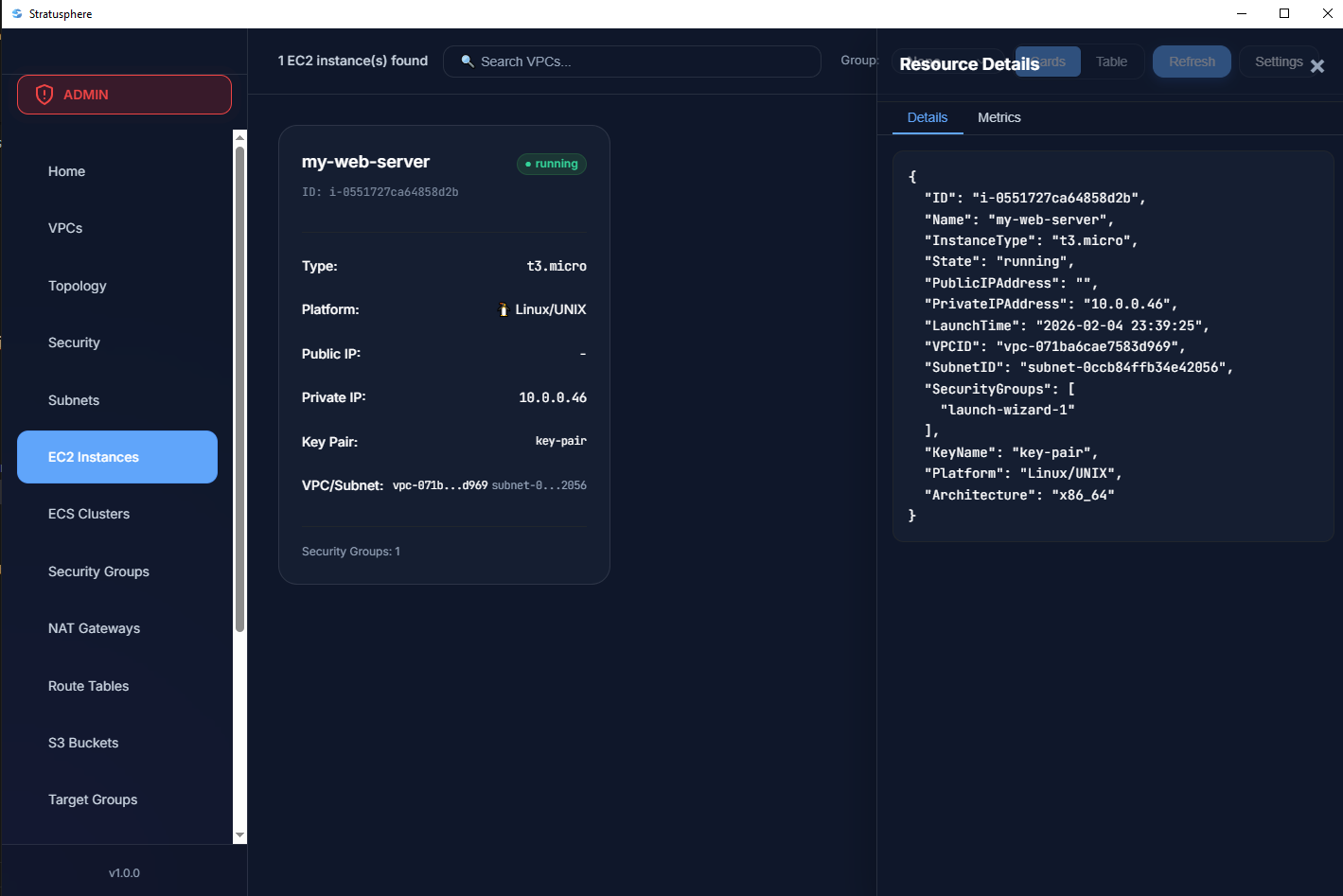
Resource Discovery
Automatically discover and catalog all AWS resources across multiple regions and services.
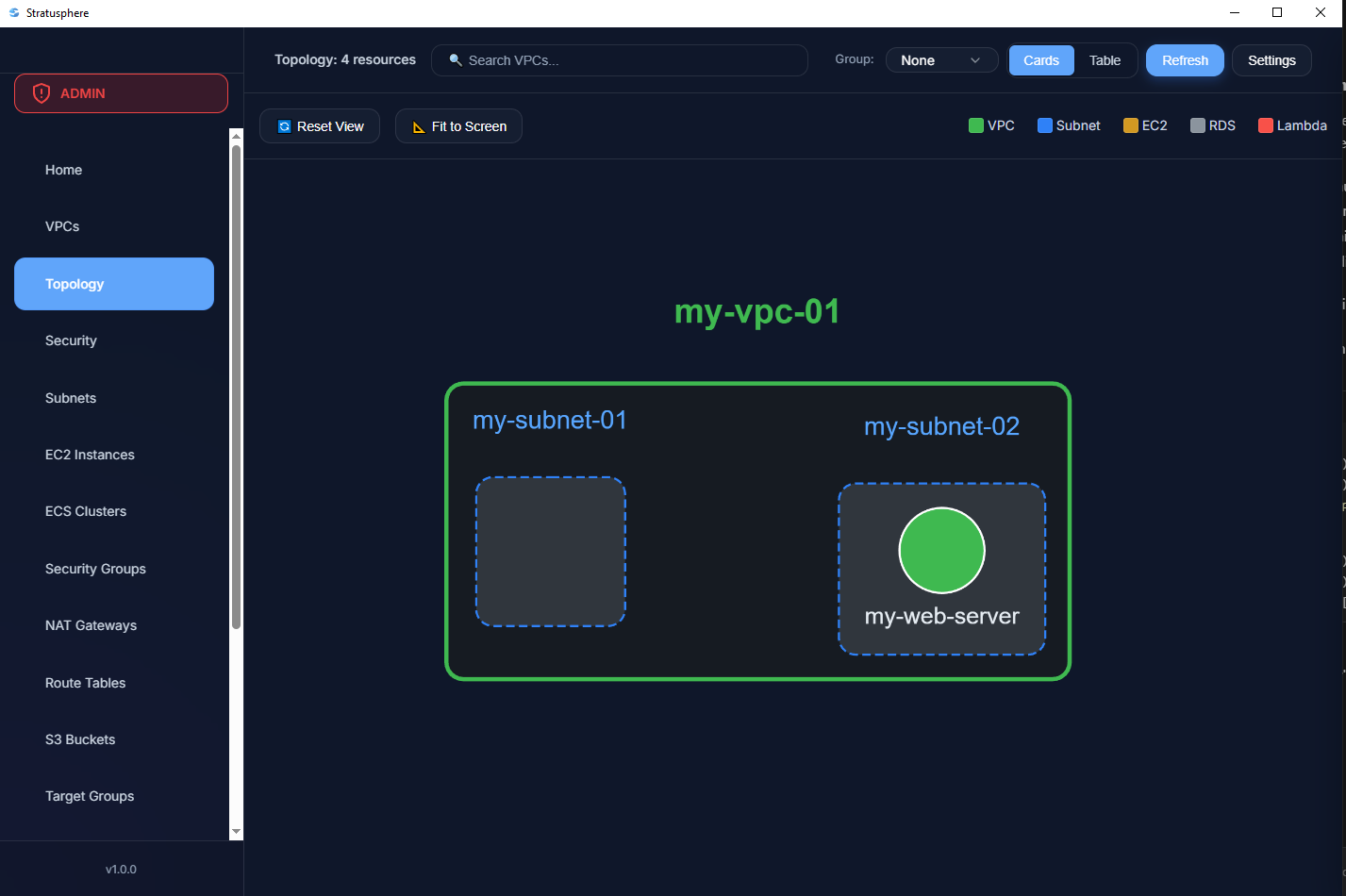
Topology Visualization
Interactive network topology graphs showing resource relationships and dependencies.
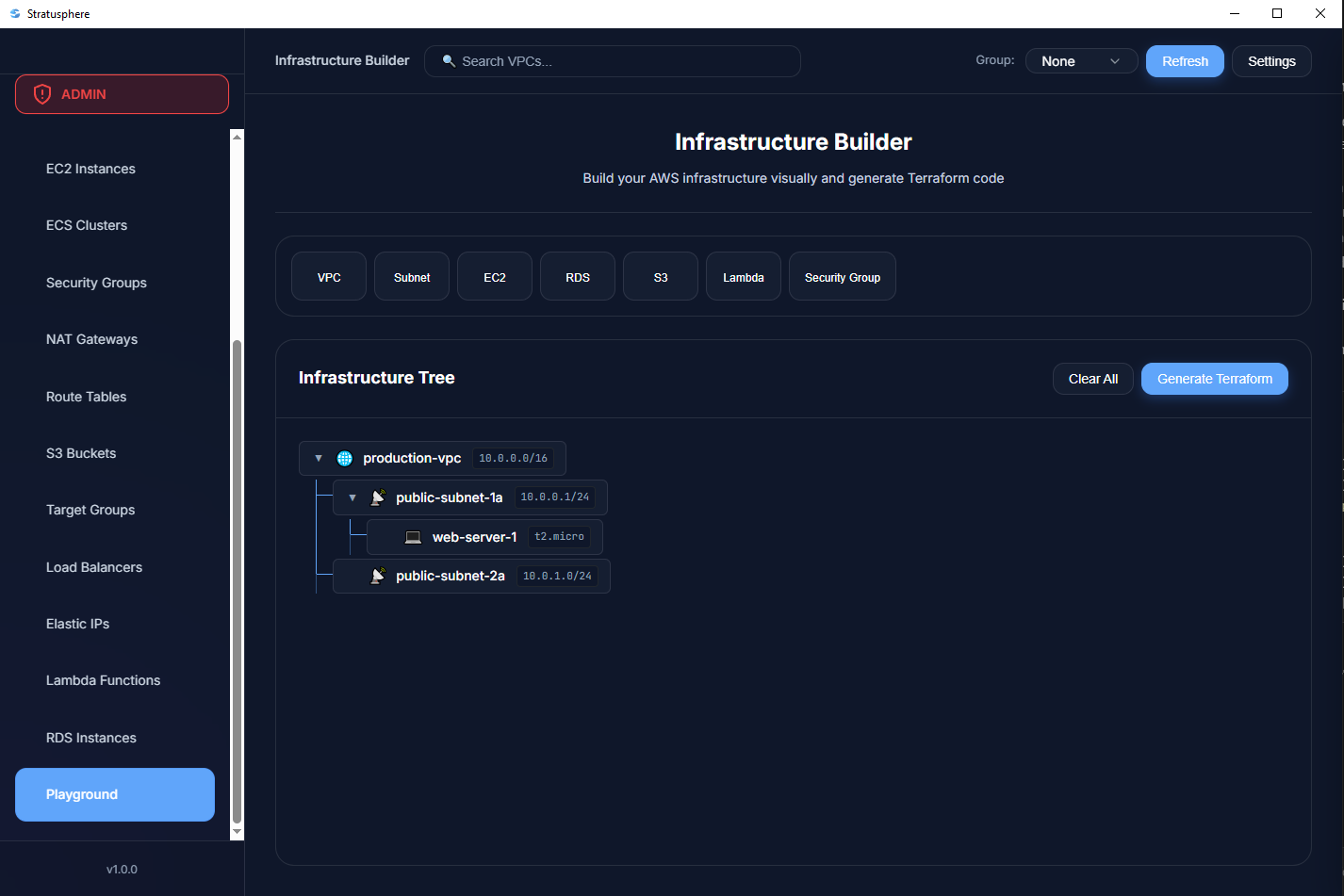
Terraform Generation
Generate production-ready Terraform code from your existing AWS infrastructure.
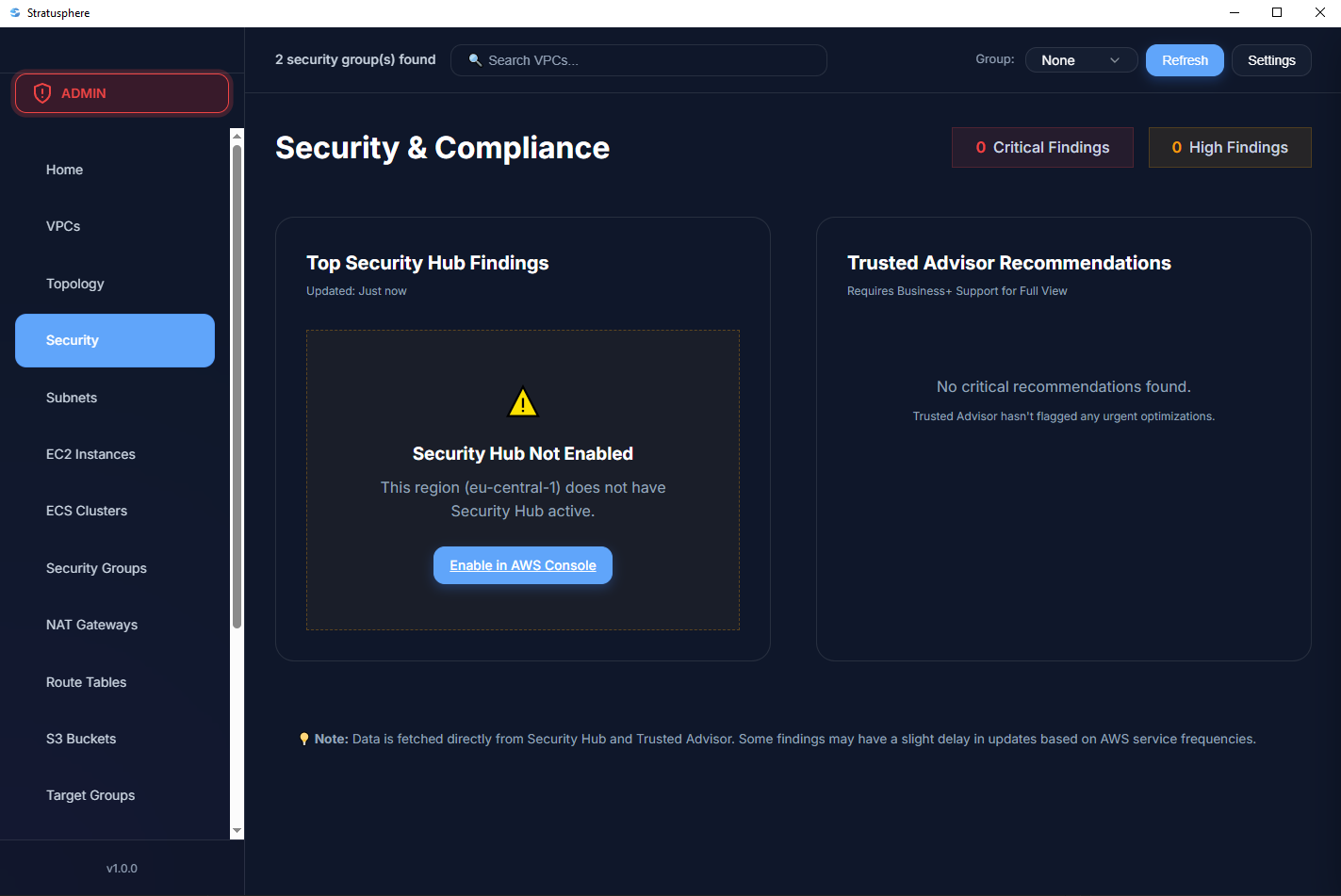
Security Analysis
Identify security vulnerabilities and compliance issues across your infrastructure.
Architecture
Technology Stack
Backend
- Runtime: Go 1.24.6
- Framework: Wails v2.11.0
- AWS SDK: aws-sdk-go-v2
- Logging: slog + lumberjack
- Crypto: AES-256-GCM
Frontend
- Architecture: Vanilla JavaScript
- Rendering: WebView2 / WebKit
- Visualization: D3.js
- IPC: Wails Runtime Bridge
- Assets: Embedded (embed.FS)
Build System
- Compiler: Go with CGO
- Bundler: Wails CLI
- Platforms: Windows, macOS, Linux
- Testing: testify framework
- CI/CD: GitHub Actions
System Architecture
┌─────────────────────────────────────────────────────────────┐
│                      Frontend (WebView)                     │
│  ┌──────────────┐  ┌──────────────┐  ┌──────────────┐      │
│  │  Dashboard   │  │  Topology    │  │  Terraform   │      │
│  │     UI       │  │  Visualizer  │  │   Generator  │      │
│  └──────┬───────┘  └──────┬───────┘  └──────┬───────┘      │
│         │                 │                 │               │
│         └─────────────────┴─────────────────┘               │
│                           │                                 │
│                  Wails Runtime Bridge (IPC)                 │
│                           │                                 │
└───────────────────────────┼─────────────────────────────────┘
                            │
┌───────────────────────────┼─────────────────────────────────┐
│                      Backend (Go)                           │
│  ┌─────────────────────────────────────────────────────┐   │
│  │              Core Application Layer                  │   │
│  │  ┌──────────┐  ┌──────────┐  ┌──────────────────┐  │   │
│  │  │   App    │  │   Auth   │  │    Terraform     │  │   │
│  │  │ Lifecycle│  │ Handlers │  │    Generator     │  │   │
│  │  └────┬─────┘  └────┬─────┘  └────┬─────────────┘  │   │
│  └───────┼─────────────┼─────────────┼────────────────┘   │
│          │             │             │                     │
│  ┌───────┼─────────────┼─────────────┼────────────────┐   │
│  │       │      AWS Integration Layer│                 │   │
│  │  ┌────▼─────┐  ┌───▼────┐  ┌─────▼──────┐         │   │
│  │  │  Client  │  │ Fetch  │  │  Topology  │         │   │
│  │  │   Init   │  │ Engine │  │   Builder  │         │   │
│  │  └────┬─────┘  └───┬────┘  └─────┬──────┘         │   │
│  └───────┼────────────┼─────────────┼────────────────┘   │
│          │            │             │                     │
│  ┌───────┼────────────┼─────────────┼────────────────┐   │
│  │       │     Infrastructure Layer │                 │   │
│  │  ┌────▼─────┐  ┌──▼─────┐  ┌────▼──────┐         │   │
│  │  │   Auth   │  │ Models │  │  Logger   │         │   │
│  │  │  (AES)   │  │ Structs│  │  (slog)   │         │   │
│  │  └──────────┘  └────────┘  └───────────┘         │   │
│  └─────────────────────────────────────────────────────┘   │
└───────────────────────────┼─────────────────────────────────┘
                            │
                    ┌───────▼────────┐
                    │   AWS Cloud    │
                    │  EC2, RDS, S3  │
                    │ Lambda, VPC... │
                    └────────────────┘
Resource Discovery Flow
-
Credential Loading
AES-256-GCM decryption from
~/.stratusphere/credentials.enc -
AWS Client Initialization
Static credentials provider with region configuration
-
Parallel Resource Fetching
10-15 concurrent goroutines with
sync.WaitGroup -
Data Normalization
AWS SDK types → Internal model structs
-
Topology Graph Construction
Build DAG of resource relationships
-
Frontend Rendering
D3.js force-directed graph visualization
Quick Start
Clone Repository
git clone https://github.com/doguhanniltextra/aws-stratusphere-dashboard.git
cd aws-stratusphere-dashboardInstall Dependencies
# Install Go dependencies
go mod download

# Install Wails CLI
go install github.com/wailsapp/wails/v2/cmd/wails@latest

# Verify installation
wails doctorDevelopment Mode
# Run in development mode with hot reload
wails dev

# Access at http://localhost:34115Production Build
# Build for current platform
wails build

# Output: build/bin/Stratusphere.exe (Windows)
# Output: build/bin/Stratusphere.app (macOS)
# Output: build/bin/Stratusphere (Linux)
Required IAM Policy
Attach this policy to your IAM user for read-only access:
{
  "Version": "2012-10-17",
  "Statement": [
    {
      "Sid": "StratusphereReadOnlyAccess",
      "Effect": "Allow",
      "Action": [
        "ec2:DescribeInstances",
        "ec2:DescribeVpcs",
        "ec2:DescribeSubnets",
        "ec2:DescribeSecurityGroups",
        "ec2:DescribeNatGateways",
        "ec2:DescribeRouteTables",
        "ec2:DescribeAddresses",
        "rds:DescribeDBInstances",
        "s3:ListBuckets",
        "s3:ListAllMyBuckets",
        "elasticloadbalancing:DescribeLoadBalancers",
        "elasticloadbalancing:DescribeTargetGroups",
        "lambda:ListFunctions",
        "ecs:ListClusters",
        "ecs:DescribeClusters",
        "sts:GetCallerIdentity",
        "iam:ListAttachedUserPolicies",
        "iam:ListAttachedRolePolicies",
        "iam:ListAccountAliases",
        "iam:ListMFADevices",
        "iam:SimulatePrincipalPolicy",
        "cloudwatch:GetMetricData",
        "ce:GetCostAndUsage",
        "servicequotas:GetServiceQuota",
        "securityhub:GetFindings",
        "support:DescribeTrustedAdvisorCheckResult"
      ],
      "Resource": "*"
    }
  ]
}
Deployment & Testing
🧪 Testing
# Run all tests
go test ./...

# Run with coverage
go test -cover ./...

# Generate coverage report
go test -coverprofile=coverage.out ./...
go tool cover -html=coverage.out

# Integration tests (requires AWS credentials)
export AWS_ACCESS_KEY_ID=xxx
export AWS_SECRET_ACCESS_KEY=yyy
export AWS_REGION=us-east-1
go test -tags=integration ./internal/aws/...
📦 Cross-Platform Builds
# Windows
wails build -platform windows/amd64

# macOS (Universal Binary)
wails build -platform darwin/universal

# Linux
wails build -platform linux/amd64

# All platforms
wails build -platform windows/amd64,darwin/universal,linux/amd64
🔧 Build Optimization
# Debug build with verbose logging
wails build -debug -v

# Production build (strip debug symbols)
wails build -ldflags "-s -w"

# With custom icon
wails build -icon appicon.png

# Skip frontend build
wails build -skipbindings
⚡ Performance Metrics
- Memory Usage: ~50 MB (idle), ~200 MB (1000+ resources)
- Startup Time: ~2s (cold), ~500ms (warm)
- Resource Fetching: 10-15 concurrent goroutines
- Cache TTL: 5 minutes for resource snapshots
Security & Best Practices
🔐 Credential Encryption
- Algorithm: AES-256-GCM
- Key Derivation: PBKDF2 (100,000 iterations)
- Salt: 32-byte random per file
- Nonce: 12-byte random per operation
Storage Locations:
Windows: %APPDATA%\.stratusphere\credentials.enc
macOS: ~/Library/Application Support/stratusphere/credentials.enc
Linux: ~/.config/stratusphere/credentials.enc
🛡️ Threat Model
✅ Best Practices
- Use IAM roles with temporary credentials (STS AssumeRole)
- Enable MFA for IAM users
- Rotate access keys every 90 days
- Use least-privilege IAM policies
- Enable CloudTrail for API call auditing
- Never commit credentials to version control
Troubleshooting
Build fails with CGO errors
Error: cgo: C compiler "gcc" not found
Solution (Windows):
# Install MinGW-w64
choco install mingw

# Or download from: https://www.mingw-w64.org/
Solution (macOS):
xcode-select --installAWS API rate limiting
Error: RequestLimitExceeded: Rate exceeded
Exponential backoff is already implemented in internal/aws/fetch.go. If you
continue to experience rate limiting:
- Reduce concurrent goroutines in fetch configuration
- Increase delay between API calls
- Request AWS service quota increase
Credentials not loading
Error:
failed to load credentials: cipher: message authentication failed
Causes:
- Corrupted credentials file
- Wrong encryption key (file modified externally)
Solution:
# Delete credentials file and re-authenticate
# Linux/macOS
rm ~/.config/stratusphere/credentials.enc

# Windows
del %APPDATA%\.stratusphere\credentials.enc
Resources not showing in UI
Checklist:
- ✅ Correct region selected?
- ✅ IAM policy includes required
Describe*permissions? - ✅ Resources exist in the selected region?
- ✅ Check application logs:
~/.stratusphere/logs/app.log